
Auto Storage Tool

Install the Chrome extension

Choose the Chrome Web Store or the manual installation.

Checking…
Chrome Web Store Coming soon
Install manually Download the extension and load it unpacked.
  1. Download the extension. Download extension ZIP
  2. Unzip the downloaded file.
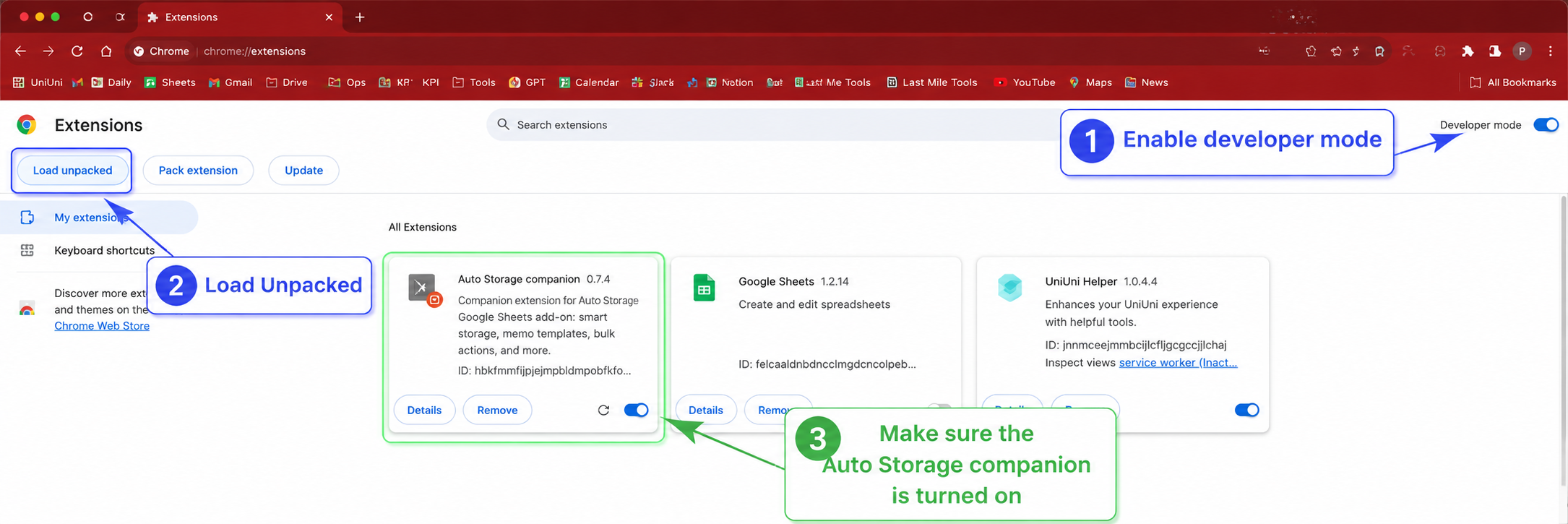
  3. Open chrome://extensions.
  4. Turn on Developer mode.
  5. Select Load unpacked, then choose the unzipped chrome-extension folder.
  6. Return here and refresh this page.
Chrome Extensions page showing Developer mode, Load unpacked, and the enabled Auto Storage companion
Reference: enable Developer mode, choose Load unpacked, and make sure the Auto Storage companion is turned on. Select the image to enlarge it.

Connect your Dispatch session

Sign in to Dispatch with Microsoft, then refresh or use its main page once.

Waiting

Start Auto Storage

Complete the two setup checks above.

Not ready